







Immigration Document Types
Here is a list of the documents that can be used to show your immigration status. You should be able to select any of these documents and status types when you complete your application for coverage. See below for information about each document type and what information needs to be included when you report your document in the application. You can also see an example of what each document looks like by selecting the name of the document in the list on this page.
On your application, select the document type from the drop-down list that corresponds with your most current documentation and status. Try to find and enter as many fields as possible, even though some fields may be labeled “optional,” to make the process go smoother and faster. Just because you have one of these documents does not mean you have an eligible immigration status to purchase Health Connector coverage or to qualify for help paying for coverage.
If you do not have access to your document when completing the application, you can select, “I have an eligible status, but I don’t have my document right now.”
If you have questions about what document should be used to verify your status, find information at Resources for Immigrants in Massachusetts from the Office of the Attorney General→
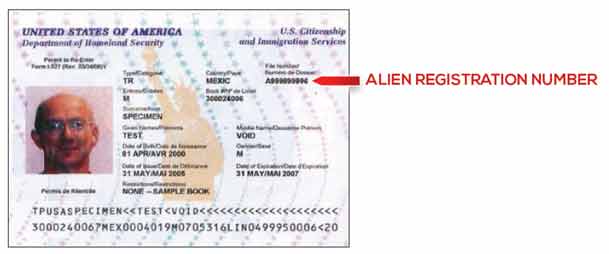
Reentry Permit (I-327)
Reentry Permit (I-327), you’ll need your alien registration number (also called USCIS number) from your document. Re-entry permits (or I-327s), when valid, allow permanent residents to leave and re-enter the U.S. These permits are located in multi-purpose booklets called “U.S. Travel Documents.”
Information Needed
- Alien Number (also called alien registration number or USCIS number) – located at the top, right-hand side of the document
- Enter your 8 or 9 digit number into this field in the online application. It will likely begin with an “A” on your document.
- Expiration Date (optional)
- MM/DD/YEAR
Reentry Permit (I-327)
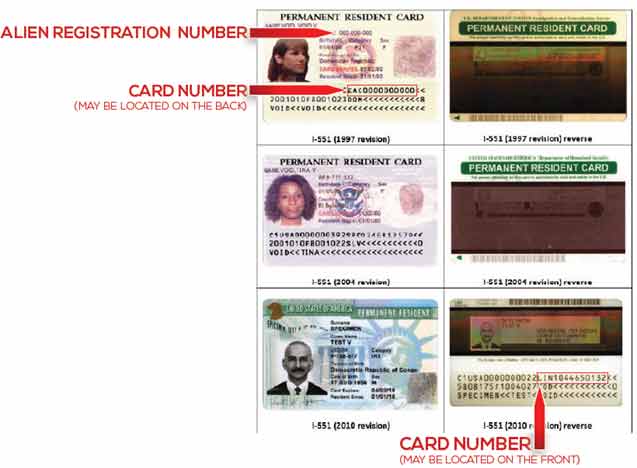
Permanent Resident Card (“Green Card,” I-551)
Permanent Resident Card (“Green Card,” I-551), you’ll need your alien number (also called alien registration or USCIS number) and card number (also called receipt number) from your document. I-551 Permanent Resident Cards (or “Green Cards”) are issued to lawful permanent residents. A lawful permanent resident (LPR) or “green card” recipient is a person who isn’t a citizen of the U.S., but who’s residing in the U.S. under legally recognized and lawfully recorded permanent residence as an immigrant. If you’re a lawful permanent resident, you should use this document, if possible.
Information Needed:
- Alien Number (USCIS Number) – listed under the heading “A#” or “USCIS#.”
- Enter your 8 or 9 digit number into this field in the online application. It will likely begin with an “A” on your document.NOTE: If your Alien Number is less than 8 digits long, add zeroes to the front of the number so the number of digits is 8 and enter that in the system
- i.e. My Alien Number is 123456, I would enter the following into my online application=
00123456
- i.e. My Alien Number is 123456, I would enter the following into my online application=
- Enter your 8 or 9 digit number into this field in the online application. It will likely begin with an “A” on your document.NOTE: If your Alien Number is less than 8 digits long, add zeroes to the front of the number so the number of digits is 8 and enter that in the system
- Receipt/Card Number – either on the front or back of the card
- Enter 13 digits in this field in the online application
- First 3 characters = Alphabetic
- Remaining 10 characters = Numeric
- e. ABC1234567898
- NOTE: Some older cards may not list a card number. If you do not have a card number, enter AAA and 10 zeroes into the Card Number field = AAA0000000000
- Enter 13 digits in this field in the online application
- Expiration Date (optional)
- MM/DD/YEAR
To verify your status, the Health Connector and MassHealth will need both the alien number and the I-551 card number. If you have trouble finding these numbers, check on the back of the card.
You can enter your I-551 card number without entering your Social Security Number (SSN) if you don’t have one yet, because it isn’t necessary to enter your SSN to get coverage through MassHealth or the Health Connector. Click here for more information about I-551s.
Permanent Resident Card (“Green Card,” I-551)
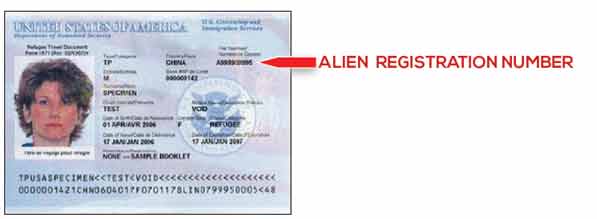
Refugee Travel Document (I-571)
Refugee Travel Document (I-571), you’ll need your alien registration number (also called USCIS number) from your document.
Refugee Travel Documents (or I-571s) may be issued to refugees and asylees for travel purposes. These permits should be located in multi-purpose booklets called “U.S. Travel Documents.”
Information Needed
- Alien Number – located at the top, right-hand side of the document
- Enter your 8 or 9 digit number into this field in the online application. It will likely begin with an “A” on your document.
- Expiration Date (optional)
- MM/DD/YEAR
Refugee Travel Document (I-571)
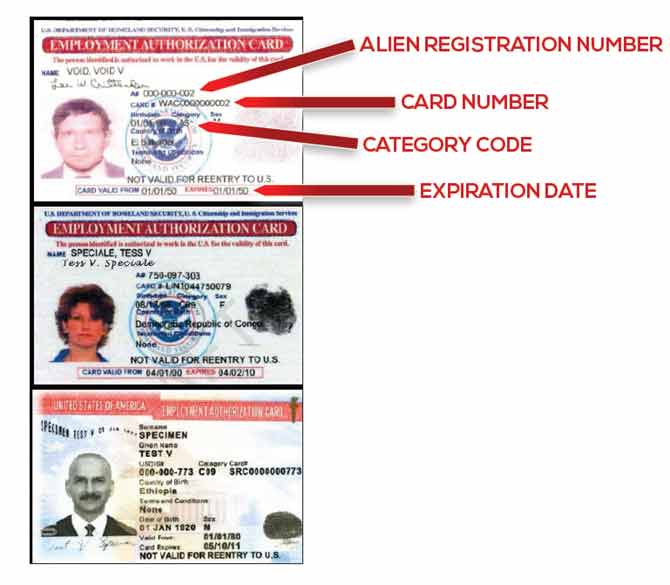
Employment Authorization Card (I-766)
Employment Authorization Card (I-766), you’ll need your alien registration number (also called USCIS number), card number, and expiration date from your document. Employment Authorization Cards (or I-766s) are issued to some people who are authorized to work temporarily in the U.S.
Information Needed:
- Alien Number ( also called the USCIS Number)
- Enter your 8 or 9 digit number into this field in the online application. It will likely begin with an “A” on your document.
- Receipt/Card Number (also called the employment authorization card number)
- Enter 13 digits in this field in the online application
- First 3 characters = Alphabetic
- Remaining 10 characters = Numeric
- e. ABC1234567898
- Enter 13 digits in this field in the online application
- Expiration Date
- MM/DD/YEAR
If you have trouble finding these numbers, check on the back of the card. Some older cards may not list both numbers. If you have an expired copy of your I-766, but you’ve renewed it, enter all of the document information you have, including information from the expired card.
Employment Authorization Card (I-766)
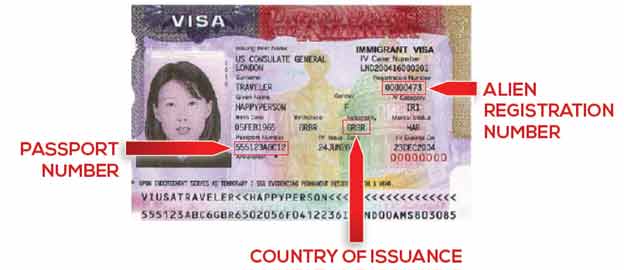
Machine Readable Immigrant Visa (with temporary I-551 language)
Machine Readable Immigrant Visa (with temporary I-551 language), Machine-readable immigrant visas (MRIVs) with temporary I-551 language are documents indicating permanent resident status.
Information Needed
- Alien Number (USCIS Number)
- Enter your 8 or 9 digit number into this field in the online application. It will likely begin with an “A” on your document.
- Passport Number
- Must be between 6-12 characters long
- Country of Issuance
- Expiration Date (optional)
- MM/DD/YEAR
- Visa Number (optional)
- Must be 8 digits long
Machine Readable Immigrant Visa (with temporary I-551 language)
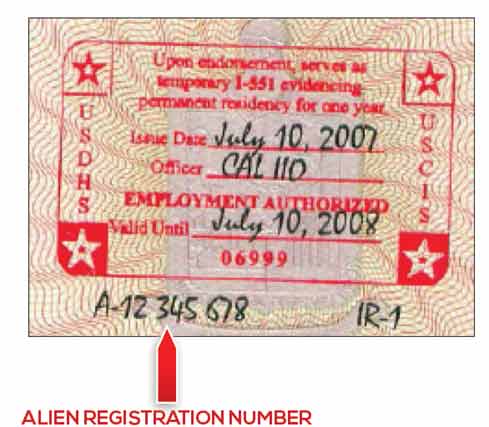
Temporary I-551 Stamp (on passport or I-94/I-94A)
Temporary I-551 Stamp (on passport or I-94/I-94A), you’ll need your alien number (also called alien registration number or USCIS number) from your document. Temporary I-551 stamps can be used to attest to permanent resident status. A temporary I-551 stamp will have a handwritten or stamped issue date and a “valid until” date. This stamp can be found on the front of an I-94 form or in the foreign passport.
Information Needed
- Alien Number (USCIS Number)
- Enter your 8 or 9 digit number into this field in the online application. It will likely begin with an “A” on your document.
- Expiration date of alien document (optional)
- MM/DD/YEAR
- Passport Number (optional)
- Must be between 6-12 characters long
- Country of Issuance (optional)
Temporary I-551 Stamp (on passport or I-94/I-94A)
Arrival/Departure Record (I-94/I-94A)
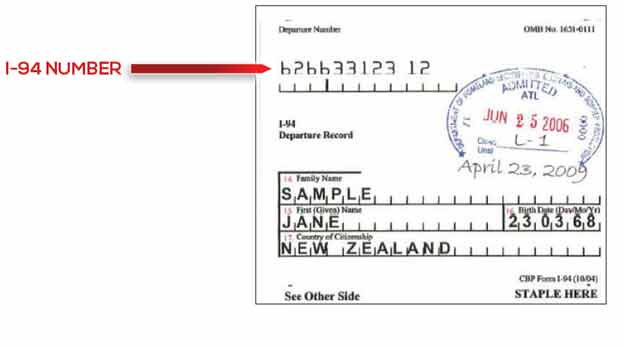
Arrival/Departure Record (I-94/I-94A), you’ll need your I-94 number from your document. I-94 Arrival/Departure Records are issued to foreign travelers when they enter the U.S. The bottom portion of the I-94 should be stapled to the passport.
Information Needed
- I-94 Number – found at the top, left-hand side of the form
- Enter your 11 digit number in this field in the online application
NOTE: If your I-94 number is less than 11 digits long, add zeroes to the front of the number so the number of digits is 11 and enter that in the system- i.e. My I-94 number is 1234567, I would enter the following into my online application=
00001234567
- i.e. My I-94 number is 1234567, I would enter the following into my online application=
- Enter your 11 digit number in this field in the online application
- SEVIS ID (optional)
- Enter your 10 digit number in this field in the online application
- Expiration date of alien document (optional)
- MM/DD/YEAR
The I-94 paper form will no longer be provided upon arrival to the U.S. at most air and sea ports of entry, except in limited circumstances. If a person doesn’t have a paper version of the I-94, they can get a copy at cbp.gov/I94.
Arrival/Departure Record (I-94/I-94A)
Arrival/Departure Record in unexpired foreign passport (I-94)
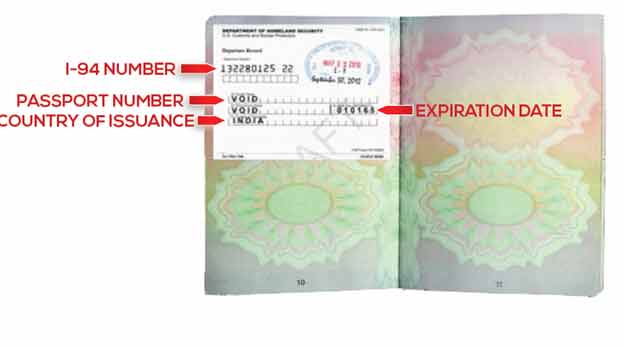
Arrival/Departure Record in unexpired foreign passport (I-94), you’ll need your I-94 number, passport number, expiration date, and country of issuance from your document. I-94 Arrival/Departure Records are issued to foreign travelers when they enter the U.S. The bottom portion of the I-94 should be stapled to the foreign passport.
Information Needed
- I-94 Number – found at the top, left-hand side of the form
- Enter 11 total digits in this field in the online application
NOTE: If your I-94 number is less than 11 digits long, add zeroes to the front of the number so the total number of digits adds up to 11 and enter that in the system- i.e. My I-94 number is 1234567, I would enter the following into my online application 00001234567
- Enter 11 total digits in this field in the online application
- Passport Number
- Must be between 6-12 digits long
- Country of Issuance
- Expiration Date
- MM/DD/YEAR
- SEVIS ID (optional)
- Enter 10 total digits in this field in the online application – do not include the “N” that begins each SEVIS ID number
- Visa Number (optional)
- Must be 8 digits long
Arrival/Departure Record in unexpired foreign passport (I-94)
Unexpired foreign passport
Unexpired foreign passport, you’ll need your passport number, expiration date, and country of issuance from your document. Passports from foreign countries are used when entering the U.S.
Information Needed
- Passport Number
- Must be between 6-12 digits long
- Country of Passport Issuance
- Expiration Date
- MM/DD/YEAR
- I-94 Number (optional)
- Must be 11 digits long
NOTE: If your I-94 number is less than 11 digits long, add zeroes to the front of the number so the total number of digits is 11 and enter that in the system- i.e. My I-94 number is 1234567, I would enter the following into my online application 00001234567
- Must be 11 digits long
- SEVIS ID (optional)
- Must be 10 digits long
You may be able to get a copy of your I-94 information by visiting www.cbp.gov/I94 and entering your information.
Unexpired foreign passport

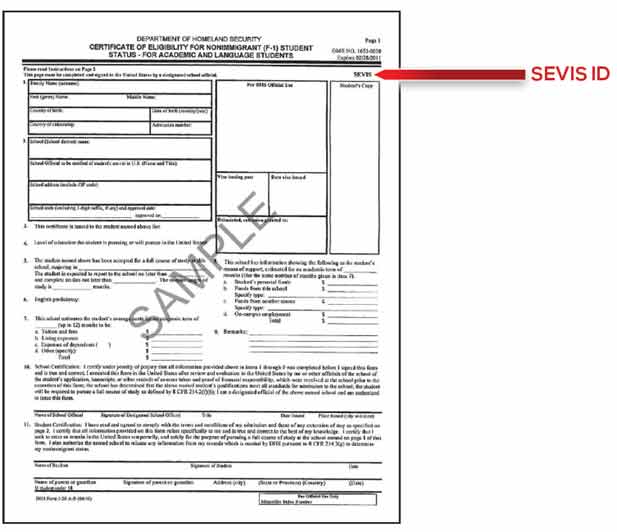
Certificate of Eligibility for Nonimmigrant (F-1) Student Status (I-20)
Certificate of Eligibility for Nonimmigrant (F-1) Student Status (I-20), you’ll need your SEVIS ID from your document. I-20 Certificates of Eligibility for Nonimmigrant Student Status are the documents that support applications for student visa statuses (F-1s or F-2s).
Information Needed
- SEVIS ID – located at the top, right-hand side of the document.
- Must be 10 digits long
- I-94 Number (optional)
- Must be 11 digits long
NOTE: If your I-94 number is less than 11 digits long, add zeroes to the front of the number so the total number of digits is 11 and enter that in the system- i.e. My I-94 number is 1234567, I would enter the following into my online application 00001234567
- Must be 11 digits long
- Expiration Date (optional)
- MM/DD/YEAR
- Passport Number (optional)
- Must be between 6-12 digits long
- Country of Issuance (optional)
Certificate of Eligibility for Nonimmigrant (F-1) Student Status (I-20)
Certificate of Eligibility for Exchange Visitor (J-1) Status (DS2019)
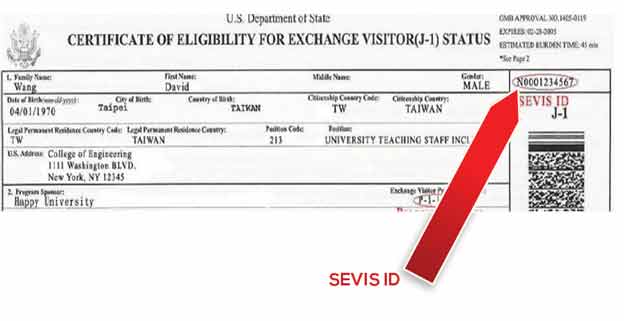
Certificate of Eligibility for Exchange Visitor (J-1) Status (DS2019), you’ll need your SEVIS ID from your document. Certificates of Eligibility for Exchange Visitor Status (DS-2019s) are the documents that support applications for exchange visitor visa statuses (J-1s or J-2s).
Information Needed
- SEVIS ID – located at the top, right hand side of the document
- Must be 10 digits long
- I-94 Number (optional)
- Must be 11 digits long
NOTE: If your I-94 number is less than 11 digits long, add zeroes to the front of the number so the total number of digits is 11 and enter that in the system- i.e. My I-94 number is 1234567, I would enter the following into my online application 00001234567
- Must be 11 digits long
- Expiration date of Passport (optional)
- MM/DD/YEAR
- Passport Number (optional)
- Must be between 6-12 digits long
- Country of Issuance (optional)
Certificate of Eligibility for Exchange Visitor (J-1) Status (DS2019)
Notice of Action (I-797)
Notice of Action (I-797),
you’ll need your alien registration number (also called USCIS number). Notices of Action (I-797s) are communication from U.S. Citizenship and Immigration Service about immigration benefits. I-797s can be used for different purposes, like an approval notice, receipt notice, or a replacement for an I-94. Sometimes these notices have other documents attached to them, like I-360s (petitions for Amerasian, widow(er), or special immigrant statuses).
If you do not have one of these numbers follow the instructions below. You will need to submit additional verifications to MassHealth or the Health Connector in order to verify your immigration status.
Information Needed
- Alien Number (USCIS Number)
- Enter your 8 or 9 digit number into this field in the online application. It will likely begin with an “A” on your document.
- SEVIS ID (optional)– located at the top, right hand side of the document
- Must be 10 digits long
- Expiration date of Passport (optional)
- MM/DD/YEAR
- Passport Number (optional)
- Must be between 6-12 digits long
- Country of Issuance (optional)
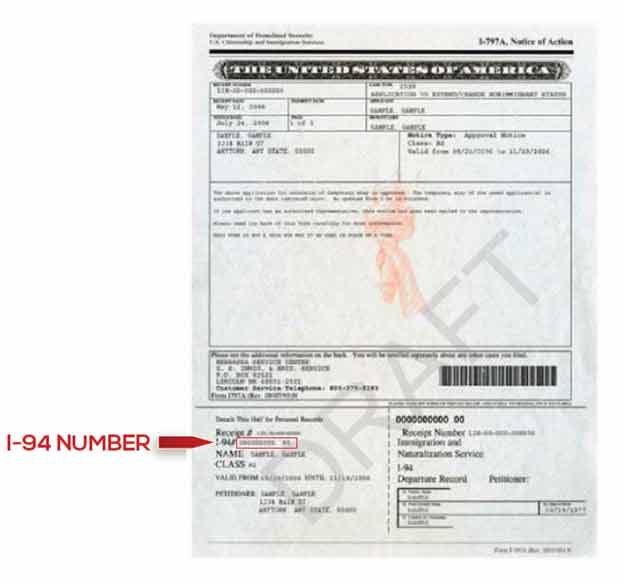
Notice of Action (I-797)/Other—With I-94 Number, you’ll need your I-94 number from your document. Notices of Action (I-797s) are communication from U.S. Citizenship and Immigration Service about immigration benefits. I-797s can be used for different purposes, like an approval notice, receipt notice, or a replacement for an I-94. Sometimes these notices have other documents attached to them, like I-360s (petitions for Amerasian, widow(er), or special immigrant statuses). If you’ve been issued a new immigration benefit or had the duration of your stay in the U.S. extended, you’ll be issued an I-797 with a tear-away I-94 at the bottom. You should enter your I-94 number.
If you do not have one of these numbers follow the instructions below. You will need to submit additional verifications to MassHealth or the Health Connector in order to verify your immigration status.
Information Needed
- I-94 Number
- Must be 11 digits long
NOTE: If your I-94 number is less than 11 digits long, add zeroes to the front of the number so the total number of digits is 11 and enter that in the system- i.e. My I-94 number is 1234567, I would enter the following into my online application 00001234567
- Must be 11 digits long
- SEVIS ID (optional) – located at the top, right hand side of the document
- Must be exactly 10 digits long
- Expiration date of Passport (optional)
- MM/DD/YEAR
- Passport Number (optional)
- Must be between 6-12 digits long
Country of Issuance (optional)
Another type of document
If you said you have another document or status type (that isn’t on the list above), you’ll be asked to select which of these document types you have.
- Document indicating a member of a federally recognized Indian tribe or American Indian born in Canada: There are a several documents that can show you’re a member of a federally recognized Indian tribe or that you’re an American Indian born in Canada, including membership cards, letters, or other tribal documents. For American Indians born in Canada, this could also include a birth certificate or other evidence of being born in Canada. You’ll need to upload your document later on in the application process.
- Certification from U.S. Department of Health and Human Services (HHS) Office of Refugee Resettlement (ORR): This is a certification letter from the U.S. Office of Refugee Resettlement that’s issued to an individual who is a victim of a severe form of trafficking. These letters state victims are eligible for benefits and services.
- Office of Refugee Resettlement (ORR) eligibility letter (if under 18): This is a letter from the U.S. Office of Refugee Resettlement and indicates a child is a victim of a severe form of trafficking. These letters state victims are eligible for benefits and services. You’ll need to upload your document later on in the application process.
- Cuban/Haitian entrant: People who are “Cuban or Haitian entrants” must be Cuban or Haitian and may include one of these, for example:
- Granted parole into the U.S.
- Have an application for asylum pending with USCIS.
- Granted special status under the immigration laws for nationals of Cuba or Haiti.
- Are a subject of removal proceedings. If you’re Cuban or Haitian or you’re not sure, you can select this, and we can check our data sources.
- Document indicating withholding of removal (or “withholding of deportation”): There are several documents that might show withholding of removal or deportation.
- Administrative order staying removal issued by the Department of Homeland Security: A document from the Department of Homeland Security (DHS) showing you got an order staying removal or deportation. There are several documents that might show you have an administrative order staying removal issued by DHS.
- Other: If you don’t see your document or status type listed, describe or enter the name of another type of immigration document issued by U.S. Citizenship and Immigration Services, Immigration and Customs Enforcement, or Customs and Border Protection. If you select “Other,” you’ll be asked to select an immigration status from an expanded list in order to continue your application. If none of the options apply to you, you may select “None of the above”.
To verify your status using only an alien number or I-94 number, select “Notice of Action (I-797)/Other – With Alien Number” or “Notice of Action (I-797)/Other – With 1-94 Number” from the document-type drop-down. A field will appear asking you to provide a description of the type of document you have that supports your status and to input your alien number or I-94 number. Follow the instructions above. Enter this number into the document number field that will appear.
If you have more than one current immigration document, select one that contains an alien number (also called alien registration or USCIS number) or 1-94 number, if possible. See below for more detailed information on these document types.
If you have temporary protected status (TPS), you may have an automatic extension of your status, even if your document is expired.
If you don’t think your immigration record correctly shows your status, you can still continue with your application and self-attest to your status. Please enter the information for your current status, and you will be able to self-attest to you status. You will be asked to send us a copy of your document so we can verify your status. To get your record updated, you can make an InfoPass appointment with a USCIS representative or review your records, or you can submit a written request. For more information, visit uscis.gov/save and select “For Benefit Applications” then “How to Correct Your Records.” Or, you can call the USCIS National Customer Service Center at 1-800-375-5283.
If you report that you have a certain document above, you’ll have the opportunity to report that you have an additional document or status.
- Document indicating a member of a federally recognized Indian tribe or American Indian born in Canada: There are several documents that can show you’re a member of a federally recognized Indian tribe or that you’re an American Indian born in Canada, including membership cards, letters, or other tribal documents. For American Indians born in Canada, this could also include a birth certificate or other evidence of being born in Canada. You’ll need to upload your document later on in the application process.
- Certification from U.S. Department of Health and Human Services (HHS) Office of Refugee Resettlement (ORR): This is a certification letter from the U.S. Office of Refugee Resettlement that’s issued to an individual who is a victim of a severe form of trafficking. These letters state that victims are eligible for benefits and services.
- Office of Refugee Resettlement (ORR) eligibility letter (if under 18): This is a letter from the U.S. Office of Refugee Resettlement and indicates a child is a victim of a severe form of trafficking. These letters state victims are eligible for benefits and services. You’ll need to upload your document later on in the application process.
- Cuban/Haitian entrant: People who are Cuban or Haitian entrants must be a Haitian or Cuban national (for example: a citizen of Haiti or Cuba, or a child born to at least one Haitian parent whether in Haiti or elsewhere in the world); and either :
-
- have a pending asylum application;
- have been paroled into the United States at any time in the past, even if the parole status has expired;
- be in removal proceedings currently; or
- be a lawful permanent resident (green card holder) who obtained this status under one of the following laws:
- The Cuban Adjustment Act (CAA);
- The Nicaragua Adjustment and Central American Relief Act (NACARA); or
- The Haitian Refugee Immigration Fairness Act (HRIFA).Document indicating withholding of removal (or “withholding of deportation”): There are several documents that might show withholding of removal or deportation.
- Resident of American Samoa
To verify your status using only an alien number or I-94 number, select “Notice of Action (I-797)/Other – With Alien Number” or “Notice of Action (I-797)/Other – With 1-94 Number” from the document-type drop-down. A field will appear asking you to provide a description of the type of document you have that supports your status and to input your alien number or I-94 number. Follow the instructions above. Enter this number in the document number field that will appear.
If you have more than one current immigration document, select one that contains an alien number (also called alien registration or USCIS number) or 1-94 number, if possible. See below for more detailed information on these document types.
If you have temporary protected status (TPS), you may have an automatic extension of your status, even if your document is expired.
If you don’t think your immigration record correctly shows your status, you can still continue with your application and self-attest to your status. Please enter the information for your current status, and you will be able to self-attest to your status. You will be asked to send us a copy of your document so we can verify your status. To get your record updated, you can make an InfoPass appointment with a USCIS representative or review your records, or you can submit a written request. For more information, visit uscis.gov/save and select “For Benefit Applications,” then “How to Correct Your Records.” Or, you can call the USCIS National Customer Service Center at 1-800-375-5283.
How do I enter document information?
When you enter your document type, you may need to enter one or more of these fields:
- Alien number: The alien number (also called alien registration number or USCIS number) can be found on the immigration document. It starts with an “A” and ends with 8 or 9 numbers. Enter the 8 or 9 digit number into the online application. You may also be required to enter additional information such as a Card Number.
- Card number: The card number can be found on several immigration documents, including the I-766 Employment Authorization Card and the I-551 Lawful Permanent Resident Card. A card number starts with 3 letters and ends with 10 numbers. If you also have an alien number or if other document information is requested, you should enter all, if possible.
- I-94 number: The I-94 number (also called the admission number) is printed on the I-94 or I-94A. This is an 11-digit number and is usually found at the top, left-hand side of the document. Note: In some cases, Customs and Border Protection may have struck out the pre-printed I-94 number and hand-written a different number on the form. If this is the case, enter the hand-written number.NOTE: If your I-94 number is less than 11 digits long, add zeroes to the front of the number so the total number of digits is 11 and enter that in the system
- i.e. My I-94 number is 1234567, I would enter the following into my online application 00001234567
- Passport number: The passport number can be found on the passport. It can be 6 to 12 numbers long.
- Country of issuance: Select the country which issued the passport.
- Passport expiration date: Enter the date the passport will expire (month, day, year). The expiration date should be listed on the document.
- SEVIS ID number: The SEVIS ID (Form I-20 or DS2019) which is 10 numbers long and is located at the top, right-hand corner of the document.
- Document expiration date: Enter the expiration date (month, day, year) listed on the document.
- Category code: Enter the 3-digit code listed on the employment authorization document. This code starts with an “A,” “B,” or “C.”
What if I have trouble finding or entering these fields, or I’m getting errors?
If you have trouble finding your document or a number on your document, call Customer Service for assistance at 1-877-623-6765 oe TTY: 711.