







Help Your Clients Choose the Right Plan
Help your small business clients shop for coverage for their employees through the Health Connector. You can compare health plans from the state’s leading carriers to find the right coverage and help your clients save up to 15% on their premium costs.
Frequently Asked Questions for Brokers
Broker Portal
How do I become certified with the Health Connector for Business?
Information is available on our Broker Check List: Registration and Certification (PDF)
How long does it take to get certified?
After completing a certification request, you will receive a request to complete a W-9 form and a link to create an account (see below “How do I create an account?”). Please allow up to 7-10 business days for review and approval of your application.
How do I request training?
Request training on the Certification page. Scroll down to “Request Certification Training” and complete the form.
How long is the training?
Brokers will receive a PDF document that has the training materials. You may go at your own pace.
How do I create an account?
Start at the Health Connector for Business landing page. View the video for more details on how to create an account.
Video: How to Create an Account
This video walks brokers through the process of creating an account on the HCB Broker Portal, from entering personal details to completing verification.
How do I change my general information, address, or banking information?
View the video to see how you can log in to your account to change your information.
Video: Account Updates
This video demonstrates how brokers can update their account information, including contact and banking details, on the HCB Broker Portal.
I’m locked out of my account…What do I do next?
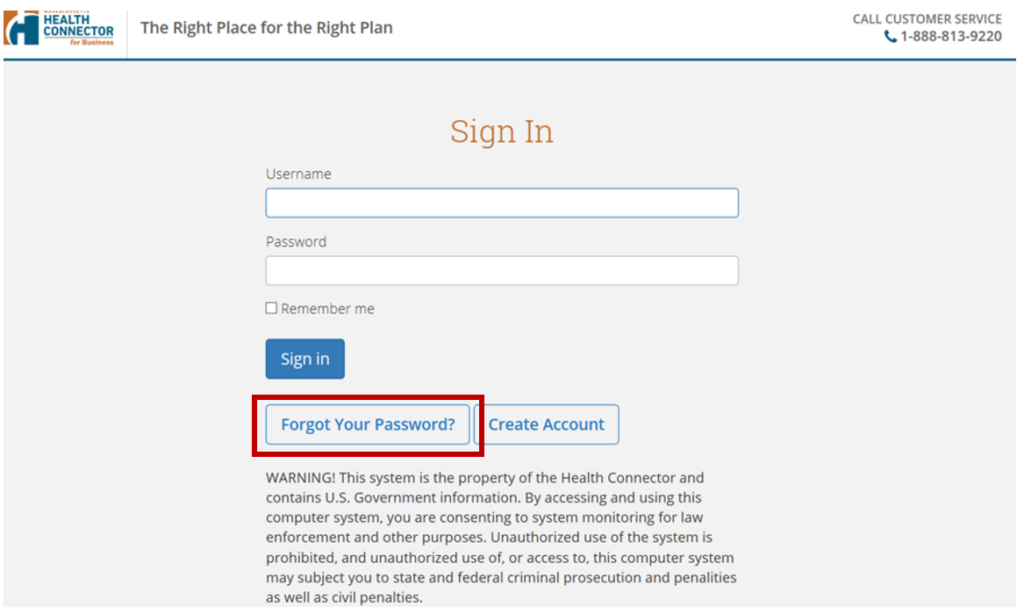
Go to the account sign-in page and click “Forgot Your Password”
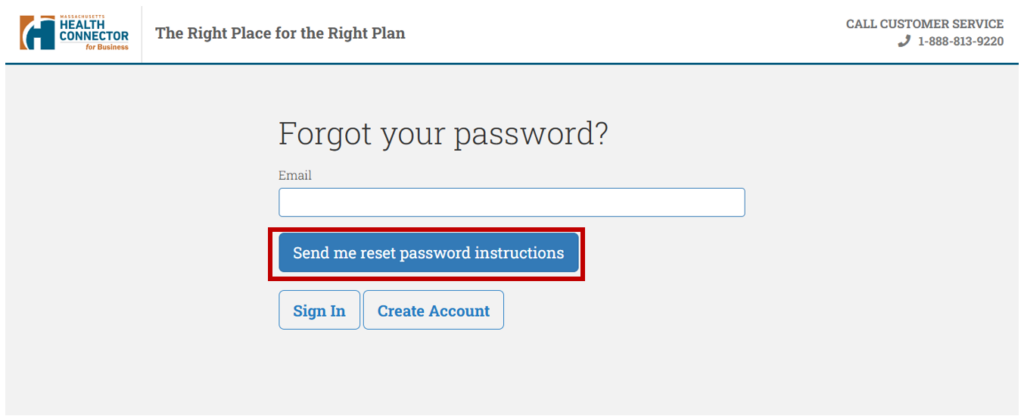
Enter your email address and select “Send me reset password instructions.”
What is the commission schedule?
Commissions are paid monthly after a group makes their monthly payment. If a group is delinquent, you will not be paid.
| Product | Group Size (number of subscribers enrolled) | Commission Rate |
|---|---|---|
| Medical |
1 to 4 employees |
$10 pspm |
| Dental | All Groups | $6 pspm |
What should I do if I haven’t received my commission?
If you haven’t received your commission, click on the employer tab and see if the employer is in delinquency. If the employer is paid to date, confirm that the banking information in your account is accurate. If so, contact our customer service department at Connector.Brokers@mass.gov.
Broker Quoting Tool
How do I get a quote for a client?
View the video for the steps to creating a quote for an employer.
Video: Creating a Quote
This video provides a step-by-step guide for brokers to create a quote for clients using the HCB Broker Quoting Tool, from setting up employer accounts to finalizing and sharing quotes.
How do I claim a quote for an employer?
View the video for the steps to claim a quote for an employer.
Video: Claiming a Quote
This video explains how brokers can claim a quote for a client using the HCB Broker Quoting Tool, including entering the claim code and finalizing the plan year.
How do I add employees to an employer roster?
View the video to add individual employees to an employer roster to create a new quote.
Video: Adding an Employee
This video provides a step-by-step guide for brokers to add an employee to an employer’s roster using the HCB Broker Quoting Tool.
How can I determine which providers or facilities are included in a plan offered through the Health Connector?
Use the Provider Search Tool to find out which providers, such as doctors and facilities, are in the network of different plans offered through the Health Connector. With this tool, you can search for providers by name, location, specialty, health plan, and more.
What are the Employer Choice Options?
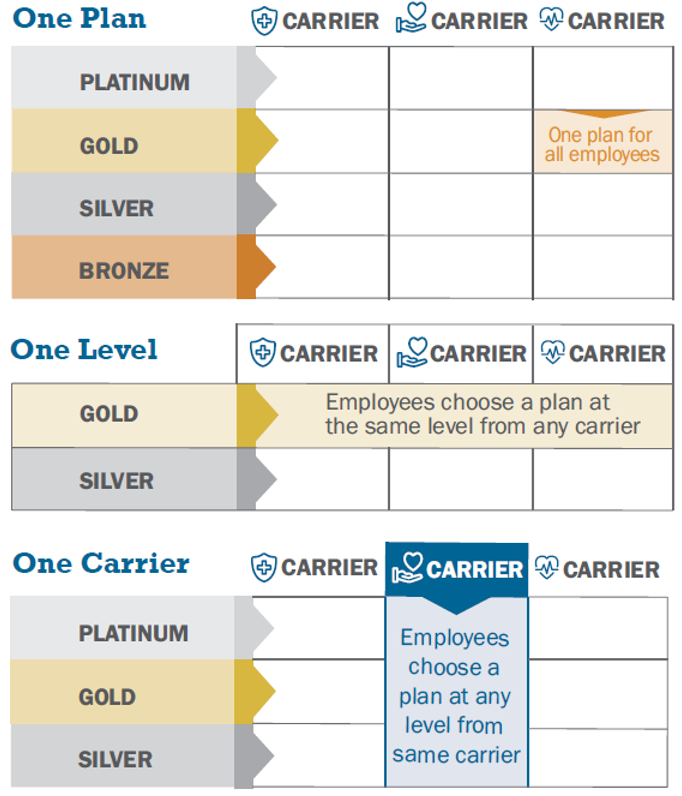
When shopping for a health plan, the employer will have three options for the group’s enrollment.
One Plan: The employer chooses one health plan. All employees will enroll in that same plan.
One Level: The employer chooses a Gold or Silver metal level. Employees can choose a plan from any carrier at the level the employer chose. No matter which plan the employees choose, the employer will still pay the same amount towards their coverage.
One Carrier: The employer chooses an insurance company (carrier). Employees can choose any plan from that carrier at the Platinum, Gold, or Silver level. No matter which plan the employees choose, the employer will still pay the same amount towards their coverage.
How do I know when a client has a renewal?
Sixty (60) days prior to a group’s renewal, you will receive a notification that a group’s renewal is ready, depending on the availability of quarterly rates. The notification will be found as a message in the renewing employer group’s Message tab. You will also receive an email mentioning the name of the group in the body of the text.
You will also receive a second reminder from the Health Connector for Business team at the beginning of the month prior to the renewal effective date. The group has until the 15th of the month prior to effective date to make changes to the plan.
How do I quote a renewing employer?
View the video to see the steps for employer renewals.
Video: Employer Renewals
This video provides a step-by-step guide for brokers to renew an employer group using the HCB Broker Quoting Tool, including updating employee participation and reviewing benefit packages.
How do I update an employer’s benefit package?
View the video to see how to update an employer’s benefit package.
Video: Updating Employer Benefits
This video provides a step-by-step guide for brokers to update an employer’s benefit package using the HCB Broker Quoting Tool, including editing plan years and adding dental benefits.
Account Manager
What qualifies employees to make mid-year changes to their coverage?
The Health Connector for Business will allow eligible employee(s) and eligible dependent(s) to enroll in coverage, make changes to their enrollment, or terminate their enrollment during a plan year because of a mid-year qualifying event.
Examples of qualifying life events include:
- Getting married or entering a legal domestic partnership
- Having a baby or adopting a child
- Getting divorced
- Death of a family member
- Moving out of the health plan’s service area
- Child losing coverage due to age
- Employment changes (starting or losing a job, or changing work hours)
For more qualifying life events, see Health Connector for Business Policy: Mid-Year Life Events.
When will an enrollment change for a QLE take effect?
The enrollment change for a QLE will take place the first of the month following or coinciding with the QLE date, except for the birth of child, which takes place on the child’s birth date. For more information on additions to coverage, see Health Connector for Business Policy: Employee Additions and Terminations of Coverage.
How can I submit a qualifying life event (QLE) for an employee?
View the video for the steps in submitting a QLE for an employee.
Video: Adding a Qualifying Life Event
This video provides a step-by-step guide for brokers to add a qualifying life event (QLE) for an employee using the HCB Account Manager.
Does Health Connector for Business administer COBRA for employers?
The Health Connector for Business and our carriers do not administer COBRA on behalf of employers or brokers, but we are able to offer the following guidance:
The Massachusetts small group continuation of coverage law (Mini-COBRA) requires small group carriers to provide for the continuation of health benefits to employees of small businesses with 2-19 employees.
Federal COBRA law governs employers with 20 or more employees.
You can learn more about Massachusetts’ mini-COBRA and federal COBRA at these two links:
What are employers’ responsibilities for COBRA?
Employers must offer COBRA coverage to qualified beneficiaries who were enrolled in health insurance. The qualified beneficiaries must determine if they want coverage. Each qualified beneficiary has individual COBRA rights, which means that any single individual can elect COBRA. The former employee does not need to elect for the dependents to obtain COBRA.
Employers must send notices to qualified beneficiaries about COBRA options within 14 days of any qualifying events (i.e., termination). Qualified beneficiaries have up to 60 days to enroll into COBRA coverage.
Qualified beneficiaries covered through COBRA must remain on the plan that was in effect on the date that they became eligible for COBRA; in other words, they cannot change plans mid-year.
Employers are responsible for collecting premiums and making payments directly to the Health Connector.
For COBRA to continue, a company must have at least one active employee enrolled in health insurance coverage.
What steps do businesses and employees need to take to enroll in COBRA?
There are several steps that businesses and their former employees must take to enroll in COBRA.
- Businesses are required to provide notice to their former employees about how to enroll in COBRA. While the Health Connector for Business is not an administrator, we created a sample notice that can be downloaded: Massachusetts-Specific Model
- An employer or broker must terminate the employee in the Health Connector system and then click the button that initiates COBRA if the employee confirmed that they want COBRA. They have 60 days to do this, and coverage will go back to the date coverage was terminated.
-
- View the video to learn how to terminate an employee in the employer portal.
- View the video to learn the steps to initiate an employee into COBRA.
- The employer will be billed for COBRA coverage along with any other employees. The employer is still responsible for collecting the premium due from the former employee.
How do I terminate an employee?
View the video to see how to terminate an employee in the employer portal.
Video: Terminating an Employee
This video provides a step-by-step guide for brokers to terminate an employee from an employer’s roster using the HCB Broker Portal.
How do I initiate an employee into COBRA?
View the video to see the steps to initiate an employee into COBRA.
Video: Initiating COBRA
This video provides a step-by-step guide for brokers to initiate COBRA for an employee using the HCB Broker Portal.
Insurance Carriers
When should my clients receive insurance ID cards?
Carriers typically mail ID cards within 7-10 business days after enrollment is processed. Some carriers also provide digital cards via their member portals.
What should I do if my clients don’t receive insurance ID cards?
The employee should first contact the carrier for assistance before contacting the Health Connector. The carrier may be able to provide the member ID over the phone.
Who should my clients contact if they have questions about claims?
You may need to explain what services are covered by the client’s plan, but carriers manage claims and approve or deny services.
How can employees get tax forms?
Carriers issue 1095-B forms to Health Connector for Business members for federal tax reporting. Carriers issue 1099-HC forms for Massachusetts state tax reporting. The Health Connector does not issue any tax forms to small group enrollees.